Regex anchors and word boundaries: search vs full validation
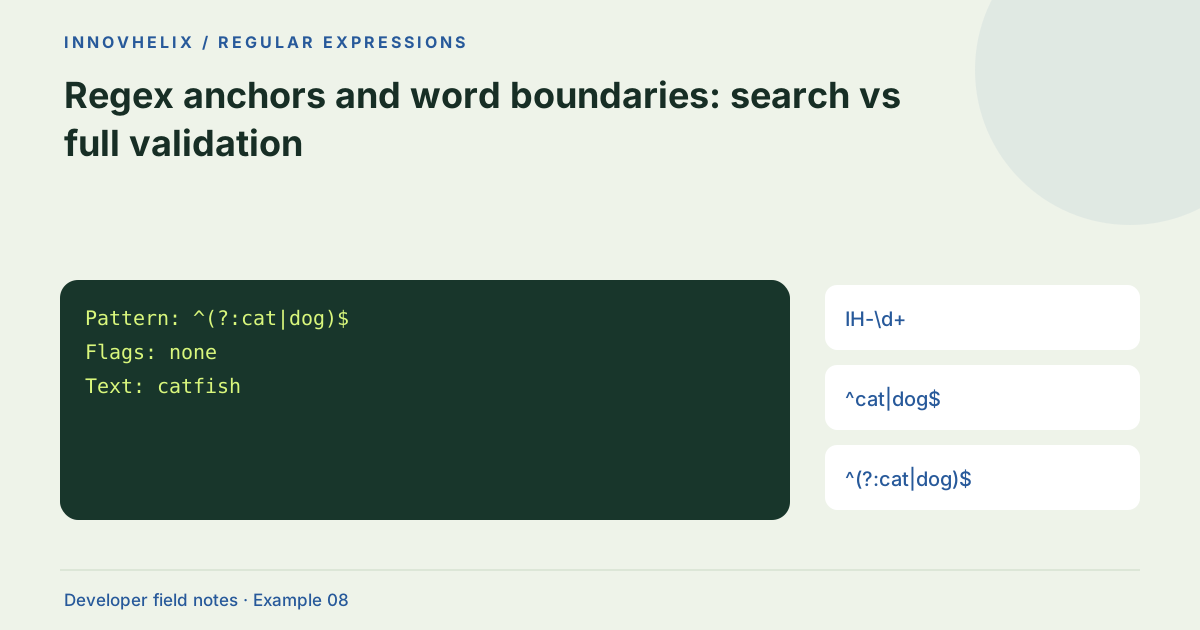
A pattern can find a valid-looking substring inside an invalid value. That is useful for searching a log and usually wrong for validating a whole field. Anchors and boundaries are the tools for expressing where a match may begin and end, but they are not interchangeable. Use examples that contain extra prefixes, suffixes and line breaks to expose the difference.
Try the Regex Tester with the synthetic example below. Processing stays in your browser; the guide explains what the result can and cannot establish.
Decision reference
| Case | Meaning or choice | What to do with it |
|---|---|---|
| IH-\d+ | Substring search | Can match inside longer text |
| ^cat|dog$ | Separately anchored alternatives | Often unintended |
| ^(?:cat|dog)$ | Grouped alternatives | Check final-newline policy |
| \btoken\b | Word boundary search | Not universal language segmentation |
Decide whether you are searching
The pattern IH-\d+ finds an order code anywhere in the subject. It will match inside "old:IH-1042:archived". If a field must contain only the code, use a full-value strategy and confirm the matched string equals the input. A search interface and a validation function often need different patterns, even when they refer to the same business identifier.
Place anchors around the complete alternative
Alternation has lower precedence than concatenation. The pattern ^cat|dog$ permits a string beginning with cat or ending with dog. Use ^(?:cat|dog)$ when both alternatives need the same boundaries. A non-capturing group makes the intent clearer without creating an unused capture. Test "catfish", "hotdog" and "dog" to see exactly which values pass under each form.
Consider final line terminators
In JavaScript without m, $ asserts the end of the input; a final newline prevents ^cat$ from matching cat followed by that newline. With m, the same anchors also apply to line boundaries, so a matching line can exist inside a longer subject. This differs from default behavior in some other engines. For strict validation, avoid multiline mode and verify the full match against the complete input. Keep trimming separate from acceptance.
Word boundaries are not delimiters for every language
A \b assertion is based on the engine’s word-character rules, not a linguistic definition of a word in every writing system. It is convenient for many ASCII tokens, but accented names, emoji and scripts without spaces need deliberate handling. If a machine identifier is delimited by commas or whitespace, a delimiter-based strategy may be more accurate than a generic word boundary.
Make trimming a separate decision
Trimming before validation changes the accepted input set. That may be friendly for a form, but inappropriate for a signed token or exact identifier. Document whether leading and trailing whitespace are accepted, and validate the normalized result only if that policy is intentional. Store the original separately when an audit trail matters. A tester should reveal the characters you supplied rather than quietly repairing them.
Write negative examples around every boundary
For a whole-field validator, include a correct value, the same value with a prefix, the same value with a suffix and the same value followed by a newline. Add leading and trailing spaces if the product has a trimming policy. The pattern should accept exactly the agreed set rather than an intuitive approximation. A matching substring can be useful evidence in search, but it is not the same assertion as accepting an entire field.
When alternatives are added later, keep the anchor tests unchanged. A refactor from one option to two can accidentally move anchors outside the intended grouping. Inspect the full match, not only a boolean, so partial matches become visible. If strict end behavior is required, verify match length against input length in the code that performs acceptance. This ordinary comparison can be clearer than an elaborate pattern. For human language search, document the boundary model too: ASCII-style word boundaries are not universal segmentation. If users search across scripts, test real representative synthetic phrases and consider a language-aware tokenizer. The browser tester makes candidate offsets visible, but choosing the correct boundary is a requirement decision that the tool cannot infer from the text alone.
Verification cases
- catfish with ^cat|dog$: Can match the cat prefix; grouping is wrong for full alternatives.
- catfish with ^(?:cat|dog)$: Should not match the intended alternatives.
- Valid token plus final LF: Verify strict full-input acceptance policy.
Worked example: grouped alternatives
Use this exact sample to isolate the behavior discussed above. Keep the operation and options with the sample when reporting a result; changing the input representation can change what the test demonstrates.
Input or question
Pattern: ^(?:cat|dog)$
Flags: none
Text: catfish
Expected result or interpretation
No match; catfish is not exactly cat or dog.Multiline mode can validate only one line
Test ^IH-\d+$ against the subject "bad\nIH-1042\nbad" using m. The pattern can match the middle line even though the complete input is not an order code. Without m, it does not match that whole subject. For a full-field check, leave multiline off and compare the full match with the input when additional assurance is useful. Do not trim away unexpected lines unless the product explicitly accepts and normalizes them. Keep a negative fixture with valid-looking content surrounded by invalid content. It catches a common mistake where a search pattern is reused as a validator and a successful substring is mistaken for whole-value acceptance.
Before you use the result
- Write down search or full-value intent first.
- Test extra prefixes and suffixes.
- Test a final newline and multiline input.
- Keep trimming explicit.
Continue the workflow
JavaScript regex flags explained through observable examples addresses choose regex flags deliberately. What regex validation can—and cannot—prove addresses choose validation layers appropriately.
Technical reference
Consult MDN browser API reference for the relevant underlying behavior or concept. Test the exact runtime used by your application when engine compatibility matters.
Corrections are welcome through Contact & feedback. Read our editorial policy for scope and limitations.