Capture groups, named groups and non-capturing groups
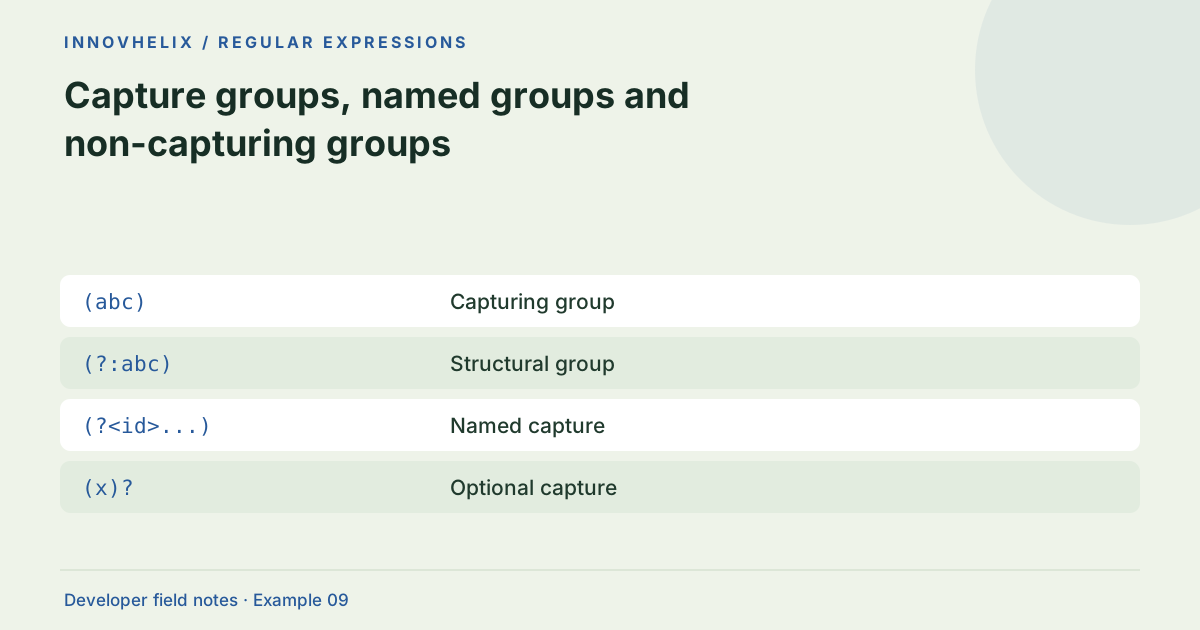
Matching text and extracting fields are related but different jobs. Capture groups let a regex report selected portions of a match so a program can interpret them. Useful patterns distinguish structural grouping from actual output fields, and they define what happens when a field is optional. This guide extracts a simple order code without turning every pair of parentheses into a dependency.
Try the Regex Tester with the synthetic example below. Processing stays in your browser; the guide explains what the result can and cannot establish.
Worked example: named fields
Use this exact sample to isolate the behavior discussed above. Keep the operation and options with the sample when reporting a result; changing the input representation can change what the test demonstrates.
Input or question
Pattern: (?<prefix>IH)-(?<id>\d+)
Flags: g
Text: IH-1042
Expected result or interpretation
Full match: IH-1042
Named fields: {"prefix":"IH","id":"1042"}
A structural alternative should not shift the field
Begin with IH-(\d+) and code that reads capture 1 as the ID. Extending the prefix to (IH|QA)-(\d+) moves the digits to capture 2 because the prefix is now captured. The application can start treating IH as an ID even though the regex matches successfully. Use (?:IH|QA)-(\d+) to preserve the positional contract, or move to named groups and update the consumer deliberately. A regression fixture should check the capture value, not only the full match. Test both prefixes and retain a leading-zero suffix if the ID must remain text. This makes a seemingly harmless pattern expansion reviewable.
Capture only the data you need
In IH-(\d+), the full match is the complete code and the first capture is the numeric portion. That captured value is still text, not a validated database ID or Number. Convert it only after checking the domain’s type requirements. Capturing fewer fields makes it easier to change the pattern later without shifting positional indexes used by application code.
Use non-capturing groups for structure
The syntax (?:...) groups alternatives or repeated units without returning another numbered capture. For example, (?:IH|QA)-(\d+) accepts two prefixes while keeping the digits as the only captured field. Ordinary parentheses would introduce a prefix capture and move the digits to another index. A small structural cleanup can prevent bugs in code that reads match[1].
Name fields in readable extraction patterns
Named groups such as (?<prefix>IH)-(?<id>\d+) describe the extraction contract more clearly than numeric positions. The JavaScript match object exposes these through groups when supported. In the tester, named groups appear beside the numbered captures. Names do not validate meaning: an id group can still be outside your allowed range or refer to a record that does not exist.
Check optional and repeated captures
An optional capture may be undefined when its branch does not participate. In JSON output, undefined array entries appear as null, while undefined object properties may be omitted. A repeated capturing group usually retains its last captured iteration rather than a list of all iterations. If you need every repeated field, iterate matches or parse the enclosing structure instead of expecting one capture to accumulate everything.
Keep extraction and interpretation separate
After extracting fields, check length, allowed prefixes and numeric range in ordinary code. This keeps business logic visible and testable. A regex that contains every business rule becomes difficult to maintain, especially when rules change independently. Create tests for a missing optional suffix, two adjacent codes and a malformed code. Keep the example text synthetic so captures do not expose real customer identifiers.
Define an extraction contract
List each returned field, its source group and what your code does when it is absent. For a named id group, specify whether the value stays a string and whether leading zeros are meaningful. For an optional suffix, decide whether absence becomes undefined, null or an omitted property in the final data model. Keep those decisions outside the regex when possible so changing a pattern does not silently change application semantics.
Create fixtures with one complete token, one missing optional part and two adjacent tokens. Review both full matches and capture values. If a structural group is added, verify that positional consumers still read the intended field. Named groups reduce that particular index-shifting risk, but they do not eliminate type and absence handling. Repeated capture groups need a separate test because their final value may be the last iteration rather than a collection. If the desired output is a list, global iteration or an appropriate parser is clearer. In JSON serialization, undefined values have different behavior in arrays and objects; interpret the tester’s null capture entries and omitted named properties with that rule in mind. The displayed object is an inspection format, not a new promise that every capture exists or has been validated for downstream use.
Verification cases
- IH-(\d+) on IH-0012: Capture is the string 0012.
- Optional group absent: Inspect missing-value serialization.
- Repeated capture group: Do not expect an accumulated array of iterations.
Decision reference
| Case | Meaning or choice | What to do with it |
|---|---|---|
| (abc) | Capturing group | Returns a positional capture |
| (?:abc) | Structural group | No capture added |
| (?<id>...) | Named capture | Accessible through groups |
| (x)? | Optional capture | May not participate |
Before you use the result
- Use non-capturing groups for structural alternatives.
- Document named-field meanings separately.
- Test absent optional captures.
- Convert extracted text only after domain validation.
Continue the workflow
JavaScript regex flags explained through observable examples addresses choose regex flags deliberately. Extract fields from simple logs without building a fragile parser addresses extract diagnostic fields from log lines.
Technical reference
Consult MDN browser API reference for the relevant underlying behavior or concept. Test the exact runtime used by your application when engine compatibility matters.
Corrections are welcome through Contact & feedback. Read our editorial policy for scope and limitations.